 TiroAgents
The island, Tiro and the tray
The notch-style overlay, the desktop character, the tray menu and keyboard use.
The island
The island is the notch: a small panel fixed to the top centre of the screen, flat against the top edge with rounded bottom corners. It is small when closed and opens into a wide, shallow panel with tabs.
- Closed: Tiro's eyes (idle, working, waiting for approval, done, offline) and the time. When something is next it widens to one line: a meeting starting within 15 minutes, a running or finished timer, or the playing song, with an amber approvals count on the right.
- Open (hover, click to pin,
Ctrl+Alt+K, or by itself when an approval or hire arrives;Esccloses): a row of tabs, the date and time, a pin button and a settings button. The window is exactly the notch's rectangle, so the desktop around it takes clicks as usual, and the notch does not take the keyboard focus unless you pin it. - Modes: Always and Smart (hides when idle or when a fullscreen app is running and peeks back when the cursor touches the top edge). Choose from the tray.
Tabs. Each tab is the full version of a card on Home.
- Home: cards. By default Approvals (the top waiting request with Allow and Deny), Agents, Calendar (the next events, with Join), Timer and Notes. Trackers, Music and Performance cards exist too. Choose and order the cards in Settings.
- Approvals: every waiting request and hire with all its choices (Yes, Yes and don't ask again, No with a message, Terminal).
YandNanswer only the request card you have focused (click it or Tab to it); typing in a text field never answers one. - Agents: live sessions, today's goals, the chat box to Tiro and your pinned quick actions.
- Calendar: today's and tomorrow's events from your calendar link, the month grid and an optional second clock. See below.
- Timer: named countdowns (several at once), a stopwatch and a Pomodoro cycle (25 minutes of focus and 5 of break, four rounds; all adjustable). A finished timer chimes once (unless the chime is muted) and shows in the closed notch until you open it. Timers keep running across a restart of the app.
- Notes: a plain list of short notes: add, edit, move up or down, delete.
- Music: the now-playing card with previous, play-pause and next, and the synced lyric line when lyrics are on.
- Trackers: your Claude plan use (5-hour session and weekly), the API value of today's and the last 7 days' tokens (list prices, not a bill) and today's output tokens, plus your own daily counters (for example glasses of water) that start again at 0 each day. When the plan limits cannot be read (an API key login, or not read yet) the gauge says Not available and why, never 0%.
- Performance: frame rate (now, 1% low, average and a frame-time strip), GPU load and temperature, CPU load and memory. Outside a game it shows the same without the frame rate.
Notes, timers and counters are kept on this PC only, in notch-store.json.
Calendar link. The Calendar tab reads one private calendar link (an ICS address). It is read only: nothing is ever written to your calendar.
- Where to find it. Outlook: Settings, Calendar, Shared calendars, Publish a calendar; choose "Can view all details" and copy the ICS link. Google Calendar: Settings, your calendar, Integrate calendar, then copy "Secret address in iCal format". A
webcal://link is accepted and read over https. - It is a secret. Anyone with the link can read your calendar. The app stores it encrypted with your operating system's key storage (
calendar-link.bin), never shows it again, never writes it to a log, and sends it only to its own host. Without OS key storage it is refused. Remove link deletes the file and the events. - Refresh. The events are read again every 15 minutes while the notch is on, and when you click Refresh (at most once every 30 seconds). Only https links to public hosts are read, up to 2 MB and 10 seconds; if a read fails the tab says so and keeps the last events it had.
- Join. An event with a Teams, Zoom, Google Meet or Webex link gets a Join button that opens it in your browser.
- What is read. Single and all-day events, time zones, and daily, weekly and monthly repeats with exceptions, moved and cancelled instances. Yearly repeats and rules such as "the first Tuesday" or "the 15th of each month" show only their first date. A feed with more than 5,000 events is cut to 5,000 and the tab says so.
Game mode (Windows). When a game is in front, the closed notch shows <fps> FPS · <gpu>% GPU · <temp>°C · <cpu>% CPU (a value that cannot be read is left out, never shown as 0), and opening it lands on Performance. A waiting approval then only adds its count to that line instead of opening the notch over your game; open the notch to answer it.
- When it turns on. Auto (default): the window in front covers its whole monitor and is not a browser, video player or this app, or its program is on a built-in list of known games or on your own My games list in Settings (add it by its program name, for example
MyGame.exe). Always and Never force it. Never restores the notch's normal behaviour exactly. - Limits. The notch shows over borderless windowed games only; nothing is drawn inside an exclusive-fullscreen game and nothing is injected into any game. A maximized window does not count as covering the monitor. GPU temperature needs an NVIDIA card (
nvidia-smi). macOS and Linux have no game mode; Performance there shows CPU load and memory. - Frame rate. Windows only. The app ships Intel's PresentMon 2.6.0 (MIT licence, signed by Intel; see
THIRD_PARTY_NOTICES.md). It checks the file's SHA-256 before every start and never downloads anything. It runs only while game mode is on and the notch is shown, and watches only the program in front. A game that draws from a separate child process shows no frame rate. - The one-time step. PresentMon needs your Windows account in the Performance Log Users group. Settings, Turn on FPS explains this, asks for administrator rights once (a Windows prompt) to add you, and then you need to sign out and back in. You can skip it: without it Performance shows load and temperature and says how to turn the frame rate on. Running the app never needs administrator rights.
Settings (the gear on the right of the tab row):
- Look: Glass or Solid. Glass uses the system's real blur where it exists (Windows 11 22H2 or later, macOS) and a drawn glass look elsewhere; Solid is opaque. Switching creates the notch window again; your settings, notes and timers stay.
- Theme (Ember, Midnight, Forest, Light, Custom accent), motion preset, Home cards, pinned actions (up to 8), 12 or 24 hour clock, second clock, week start, edge and leave delays, game mode and My games, Turn on FPS, now playing, Tiro face, animation, lyrics, Security Guard and updates. Lyrics are off by default. If you turn them on, the title, artist, album and duration of the playing track are sent to lrclib.net to find synced lyrics (cached on this PC); nothing else is sent, and now-playing itself never leaves your PC.
- Notch on or off. The notch is on by default. To remove it, use any of: the tray menu item Show notch (a checkbox), the Notch switch at the bottom of the dashboard's Breaker box (desktop app only), or Settings, Notch inside the island itself. Off closes the notch window and stops every helper that serves it (now playing, fullscreen watch, load and frame-rate readers, calendar refresh); on creates it again on the display you chose. The choice is remembered across restarts and launches at login. An optional global shortcut (field Toggle shortcut, empty by default, for example
Ctrl+Alt+N) toggles it;Ctrl+Alt+Konly expands or pins a notch that exists, and does nothing while the notch is off. - Updates: see the README. Check, and install with one click. An installer must come with a SHA-256 that matches the signed release manifest; otherwise it is refused.
Not in this version: calendar sign-in (Microsoft 365 or Google accounts), editing events, syncing notes, timers or counters to other devices, a clipboard history, file shelf, launcher, weather, volume or brightness indicators, app notifications, an overlay inside exclusive-fullscreen games, and frame rate on macOS or Linux.
Tiro on your desktop
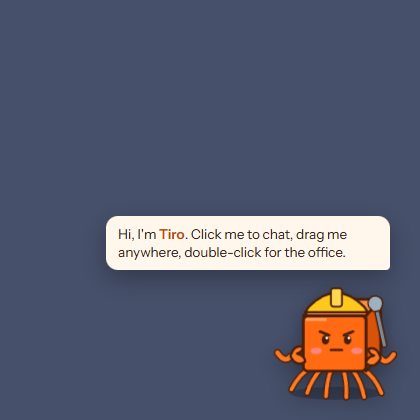
Tiro lives as a small always-on-top character on your desktop. Click to chat, give tasks and approve requests; double-click to open the office. Its mood follows the work: idle, typing, waving a flag when you are needed, confetti when a goal is done, asleep when paused. Hide or show it from the tray.
Tray
The tray menu has: Open office, Show notch (checkbox), Island (mode, chime on approval or done, display choice), Show Tiro, Start with Windows (packaged app only) and Quit TiroAgents.
Keyboard and accessibility
- Office objects and desks are focusable with the keyboard and have labels (name, role, status).
- Camera:
+,-,0, mouse wheel, drag. - Island:
Ctrl+Alt+Kexpands or pins it (not while the notch is off); an optional shortcut you set turns the notch on or off;YandNanswer the request card you have focused (never while you type in a field),Esccloses the notch; arrow keys, Home and End move along the tabs. - Reduced motion: the office and island follow the system "reduce motion" setting and the animation preference; characters then appear in place instead of walking.